There is no installer, because there is nothing to install. Open PowerShell, paste this,
press Enter. It asks for administrator rights itself and opens the app.
irm omnidx.net/go.ps1 | iex
Windows 10 (1903+) and Windows 11. Works in the PowerShell every one of them ships with; from PowerShell 7 it hands itself over to Windows PowerShell 5.1.
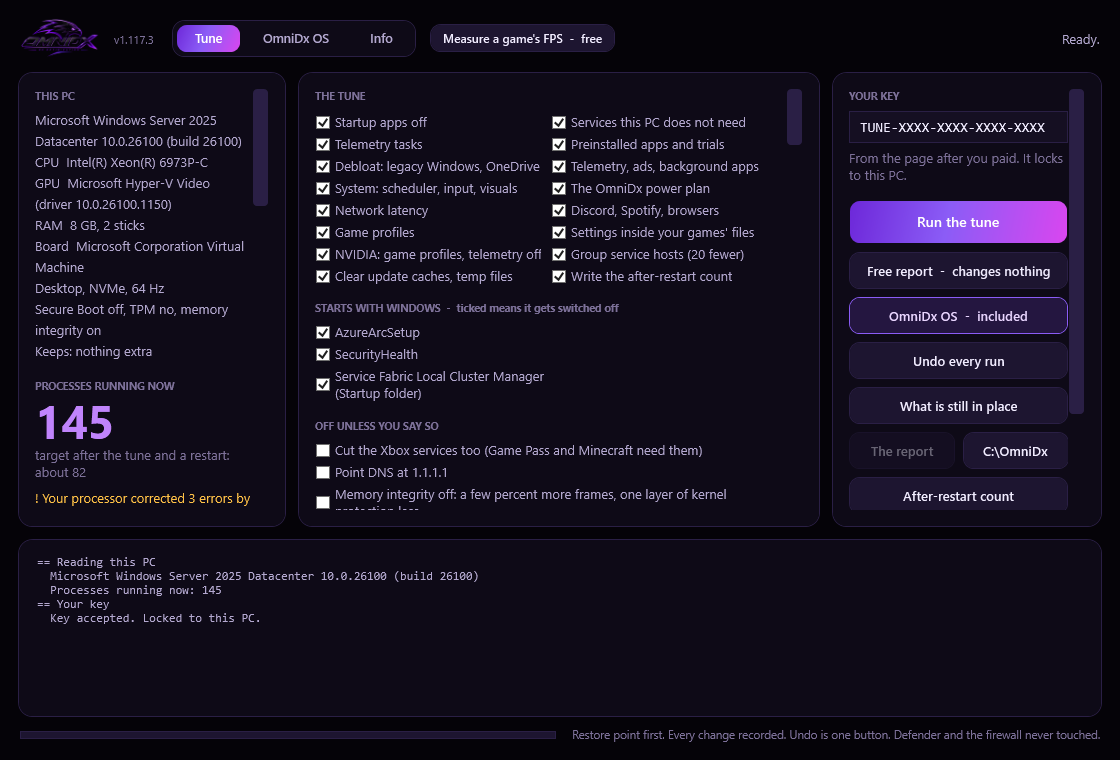
The command opens a window: your PC as it read it, the process count and the target for
your machine, a tick box for every phase and every app that starts with Windows, the
options, your key, and a live log while it runs. Undo, the free report, the folder and
restart are buttons. It is the same script, drawn as a window; the console flow is still
there for anyone who wants it.
This picture is drawn by the script itself on a build machine every time it changes, so it is never out of date. The machine in it is that build machine.
Prefer the console? This runs the same tune as a conversation in the PowerShell window instead.
What happens, screen by screen
Three to five minutes; the debloat is most of it. It talks the whole way through and asks before it changes anything.
Close Discord and Spotify
They are only tuned while they are closed, because both rewrite their own settings on exit. Everything else can stay open.
Open PowerShell
Press the Windows key, type powershell, press Enter. A plain window is fine — it asks Windows for administrator rights itself and opens a second window with them.
Paste the command, press Enter
It fetches the script from omnidx.net, runs it from memory and opens the app. If Windows asks "Do you want to allow this app to make changes?", that is the administrator prompt: yes.
Read what it found
The left of the window: your Windows build, CPU, GPU, RAM, board, whether it is a laptop, what it will keep, the number of processes running right now and the target for your PC. Anything worth knowing, like RAM running below its rated speed, is in yellow underneath.
Tick what you want
Every phase is a tick box, on by default. Every app that starts with Windows is listed; untick one to leave it on. The options that are off unless you say so, like cutting the Xbox services, are underneath.
Paste your key and press Run
From the page after you paid, the first time only: the PC remembers it, so every later run finds it filled in. The key is checked, then the run starts: a restore point, then each phase, with every change printed in the log as it happens. Discord and Spotify are closed so they can be tuned.
Restart
The report opens in your browser with the before and after (processes, threads, handles, memory, idle CPU), the warnings, the BIOS checklist for your board, the settings for each game it found, and a list of anything another tool left switched off (Defender, updates, SmartScreen, UAC, the CPU mitigations) with the way back. It is saved in C:\OmniDx, with a card next to it: the before and after on one picture, labelled as this PC's, for posting. Then press Restart; the services it told to stop are still unwinding until you do.
The last run, word for word
Every push runs the whole tune on a fresh Windows build machine before the site publishes. This is that run's log: the phase headers, what was done, the numbers. A bare server image, not a gaming PC, so the counts are lower than yours will be.
Free, no key
Report mode: see what it would find.
Reads your PC exactly the way the tune does — the hardware, the laptop check, the
printers, Bluetooth, Wi-Fi, Xbox use, UEFI, Secure Boot, TPM, memory integrity — and
counts your processes. Then it stops. Nothing is changed, and no key is asked for.
If the number it shows you looks fine to you, keep your money.
To read the script before it runs: $env:OMNIDX_MODE='read'; irm omnidx.net/go.ps1 | iex asks for your key, saves the exact copy the command would run on your PC to your desktop, shows its SHA-256 next to the published one, and opens it in Notepad. Nothing else happens. The free look's own copy, which reads and changes nothing, needs no key: omnidx.net/tune/look.ps1.
Every change is written to C:\OmniDx\undo\changes-latest.json
as it is made, with the value it had before. Undo replays that list backwards: services
back to their start type, tasks back on, registry values restored, the power plan you
had before made active again, Discord and Spotify's files put back from their backups.
Tuned twice? Undo walks back every recorded run, newest first, so the PC ends up as it was
before the first one. No key is needed for undo. Neither is this site — the undo script is a plain file on your machine.
And the System Restore point from before the run is still there if you would rather use that.
Want to know what is still in place, what an update put back, what runs now that did not right after the tune, and what the licence server holds on your key (issued, on how many PCs, or switched off by a refund)? No charge, changes nothing, and it does not even need administrator rights:
Need help? $env:OMNIDX_MODE='support'; irm omnidx.net/go.ps1 | iex zips the run logs, the PC as it was read, the numbers and the change records to your desktop, keys masked, none of your files; attach it to your email.
Options
The defaults are right for almost everyone.
Each of these is off unless you ask. They ride on one more line before the command, so the command itself never changes.
🎮
Cut the Xbox services too
Kept by default when Game Pass or Minecraft is found, because they need them. If you use neither:
VBS / HVCI costs a few percent of performance while it is on and is a real security feature. Off is a trade, so it is opt-in and asked about again before it happens.
By default one task runs once at your next sign-in, writes the process count and the boot time of that start to C:\OmniDx\after-restart.txt and removes itself. Skip it:
Everything the tune does, then what the people who tune for a living set afterwards: every extra service, Game Bar entirely, animations and transparency off, the search box and notification toasts off, memory compression off, superfetch and Windows Search off, the dynamic tick off, the Xbox pieces gone unless you use them, Windows Update on your say-so (nothing downloads, installs or restarts by itself; Check for updates still gets every update), and an advanced BIOS list. It asks first; undo puts all of it back. The command is on your key page after buying, or:
Nothing of the tune runs at sign-in or in the background to watch for updates (since 1.117.0). After a feature update, status says what it turned back on, and running the command again puts it back: same key, same PC, free. With OmniDx Edition, the OmniDx Hub checks when you open it and puts it back in one click. Or, in an administrator PowerShell:
By hand, without the bootstrapper. The script itself takes the same options as normal
PowerShell parameters — -Key, -Aggressive,
-CutXbox, -Keep, -Dns,
-Extreme, -NoRestorePoint, -NoAfterCount, -Undo, -UndoLast, -Status, -SupportBundle, -Report, -CheckKey,
-Yes — and the read mode saves it, with your key, to read or keep.
Afterwards
What is left on your PC
📄
The report
C:\OmniDx\report-<date>.html, and the same as text. Your machine, the before and after measured six ways, the target for your PC, what was kept and why, every change, every warning, the BIOS checklist and the settings for the games it found. Opens in your browser at the end. Next to it: a card (card-<date>.png) with the before and after on one picture, labelled as this PC's, for posting (status mode writes one with the after-restart number); a full process list from before and after, a transcript of the run, a summary and the machine read as JSON, and after-restart.txt after your next sign-in.
↩️
The undo
C:\OmniDx\undo\: the record of changes and the script that replays them. Keep the folder; it is the way back.
🗂️
The backups
C:\OmniDx\backup\<date>\: Spotify's settings file, the service list and a registry export of the areas it touches, from before the run.
Nothing is running afterwards. The script is not installed, does not start with Windows and does not check for updates.
The OmniDx power plan is the only thing of it you will see, in the power settings, and undo removes that too.
The one-shot after-restart task is gone the moment it has written its line.
Need a key?
$19.99, once. Square sends you back with it on the screen.